
Presets
A preset bundles every overlay appearance setting (scoreboard, hand stack, card display, durations, and layer order) into one package. Presets let you switch looks instantly or share a look with someone else. They live at the top of the General section.
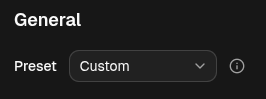
Switching presets
Section titled “Switching presets”The Preset dropdown lists the bundled presets:
- Spellsplice — the default look.
- Pro Tour Main Stage and Pro Tour Side Table — broadcast-style scoreboards with best-of-3 win pips.
Pick one to apply it across every element at once. As soon as you change any setting, the dropdown switches to Custom, meaning your look no longer matches a saved preset.
Sharing presets
Section titled “Sharing presets”- Export — names and downloads your current look as a self-contained JSON file. Everything needed to reproduce it (including any custom scoreboard SVG) is inside.
- Import — loads a preset JSON file and applies it.
Config reference (JSON)
A preset file is the full overlay config bundle. The bundled presets ship as
JSON files under public/presets/ in the app, listed by public/presets/index.json:
{ "default": "spellsplice", "presets": ["spellsplice", "pro-tour-main-stage", "pro-tour-side-table"]}To add a bundled preset, drop a preset JSON next to the others and add its slug
to the presets array.