
Annotations
Annotations are labelled boxes that hold cards you want to call out during a match — a graveyard, the top of a library, a card named by an effect. Each slot draws as a titled container with its cards stacked inside, and a side’s slots stack into a single column.
Configure them in the Annotations section. Each player is set up separately, under Left Player and Right Player.
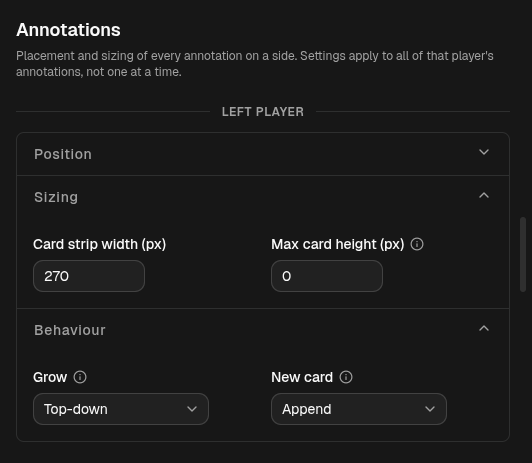
Position
Section titled “Position”- Follow hand stack — on by default. The column sits directly above that player’s hand stack and matches its card strip width, so the two read as one unit. While this is on, Anchor, Offset, and Card strip width are inherited from the hand and cannot be edited.
- Anchor and Offset (px) place the column on the frame once Follow hand stack is off. See Anchors & Offsets.
The anchor also decides which edge of the frame cards slide in from, so a column anchored to the right has its cards enter from the right.
Sizing
Section titled “Sizing”- Card strip width (px) — how wide each card strip is drawn. Inherited from the hand stack while Follow hand stack is on.
- Max card height (px) — caps the cards inside each slot. When a slot
holds more than fits, the cards nearest the top stay and the rest collapse
into a +N pill. Set it to
0for no cap (show every card).
Behaviour
Section titled “Behaviour”- Grow — the direction the column of slots extends from its anchor as slots fill: Top-down, Bottom-up, or Center. Inherited from the hand stack while Follow hand stack is on.
- New card — where a card dropped into a slot lands: Append (at the end) or Prepend (at the front). This is independent of the hand stack’s own setting, so the hand can append while annotations prepend.
Config reference (JSON)
{ "follow": true, "anchor": "bottom-left", "offset": { "x": 8, "y": -24 }, "cardStripWidth": 340, "growth": "bottom-up", "insert": "append", "maxSlotHeight": 0}follow— inherit placement and strip width from the hand stack (defaulttrue). Whentrue,anchor,offset, andcardStripWidthare ignored.cardStripWidth— strip width in pixels (default340).growth—top-down,bottom-up, orcenter(defaultbottom-up).insert—appendorprepend(defaultappend). Optional.maxSlotHeight— per-slot pixel cap,0= unlimited (default0). Optional.
Presets saved before annotations were configurable have no annotations block.
They load with follow on, so they keep rendering exactly as before.