
Player Hand
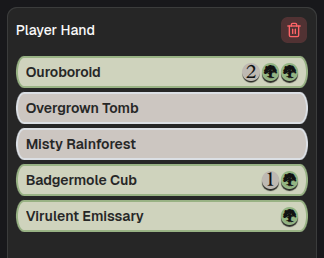
Player Hand holds the cards currently in that player’s hand. This panel is the source of truth for the hand stack overlay, what is listed here is what viewers see.
Adding and removing cards
Section titled “Adding and removing cards”Drag cards in from the library (drawing a card), or from an annotation (returning a card to hand).
Drag a card out to:
- the library, to remove it from hand (discard, mill, whatever it was)
- an annotation, to move it there (say, into the graveyard)
- the card display, to show it, see Playing and Highlighting Cards
Clearing the hand
Section titled “Clearing the hand”
The trash icon empties the hand in one go. It is disabled when the hand is already empty.
Empty state reads “No cards in hand”.