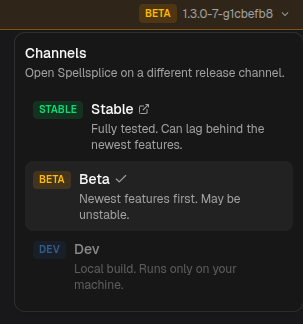
Release Channels
Spellsplice ships on three channels. They are the same app at different points on the release timeline. Pick by how much polish versus how many new features you want.
| Channel | Where | Use it if |
|---|---|---|
| Stable | app.spellsplice.com | You want the tested, reliable build. |
| Beta | beta.spellsplice.com | You want new features first and can tolerate rough edges. |
| Dev | Local only | You are running the app from source. |
Stable
Section titled “Stable”The default. Every feature has been through Beta first. It can lag behind the newest additions, but it is the version to recommend to anyone who just wants things to work.
Updated on every change, so it always has the latest features. Because those changes have not been through a full release yet, Beta can be unstable.
Stable and Beta share nothing at runtime beyond the code: projects, settings, and Live Mode state live in your browser per site, so switching channels does not carry your data across.
The build you get from running the project locally (npm run dev). It only ever
runs on your own machine, so there is no public URL. See
Running Locally for requirements and setup.
Switching channels
Section titled “Switching channels”Open the channel badge in the app’s top bar (top right, shows the current channel and version) to see all three and jump between Stable and Beta. Each channel keeps its own browser storage, so save or export a project before moving if you want to continue it elsewhere.