
Annotations
Annotations are named groups of cards kept alongside a player’s hand: Graveyard, Top Deck, cards exiled by a trigger, whatever the match needs. Each side has its own list, and two exist by default: Graveyard and Top Deck.
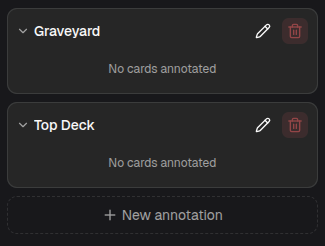
An annotation row
Section titled “An annotation row”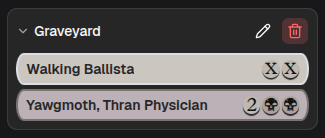
Each annotation is a collapsible row.
- Click the header to expand or collapse it. Collapsed, it shows the card count.
- The info icon appears when the annotation has a description, and shows it on hover.
- The pencil icon opens the edit dialog.
- The trash icon empties the annotation. Disabled when already empty.
Expanded and empty, it reads “No cards annotated”.
Filling an annotation
Section titled “Filling an annotation”Drag cards in from the library, from the hand, or from another annotation.
- From the library, the card is copied in (the library is a permanent source).
- From the hand or another annotation, the card is moved, it leaves where it came from.
Drag a card out of an annotation onto the library to remove it, onto the hand to move it into hand, or onto the card display to show it, which follows the usual Play / Highlight rules.
Creating and editing
Section titled “Creating and editing”
New annotation at the bottom of the list opens a dialog.
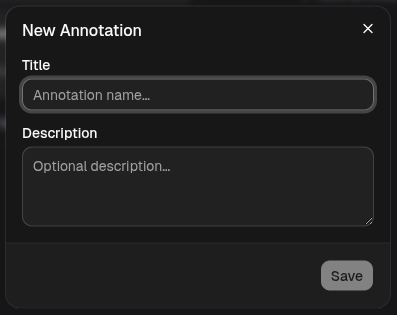
- Title — required, the name shown on the panel.
- Description — optional, surfaced through the info icon.
Editing an existing annotation opens the same dialog with a Delete button.
Resetting
Section titled “Resetting”Reset Match clears the cards out of every annotation on both sides. The annotations themselves, including any you created, are kept.